-
Type:
Bug
-
Resolution: Not A Defect
-
Priority:
 Major
Major
-
Component/s: active-choices-plugin, job-dsl-plugin
-
Environment:Jenkins: 2.249.1
OS: Windows Server 2016 - 10.0
Java 1.8.0
Active Choices 2.5.7, Job DSL 1.78.1
Description:
Using Job DSL Plugin to create a job from the template job, the job generates incorrectly. This template job contains Active Choice parameter with script content. After generating a new job with this job template using Job DSL plugin and going into the build menu, we find that the parameter doesn't work, as the fallback script executes.
Going into Configure and saving without changing anything, we find that this fixes the issue and script executes correctly. The script is working properly in template job, so the issue is probably happening at the moment of the job creation.
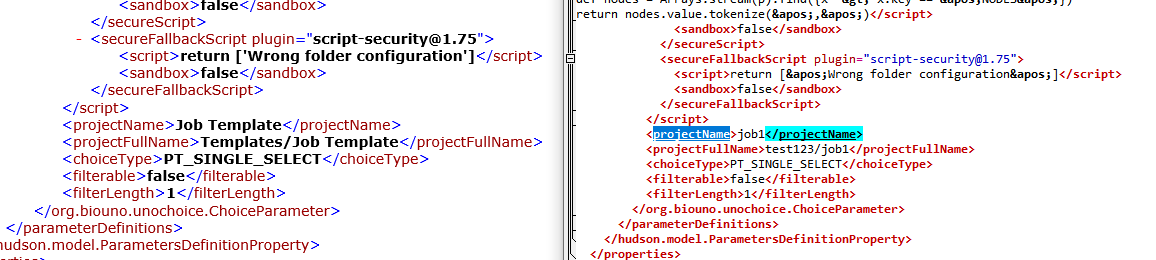
I attach logs of the job XML file before and after saving the job in Configure menu (without changing anything). Analyzing them, one can find that there's a difference in script content on escaped characters, like:
'
"
which are escaped in the "after" file. Below on the left is how the script looks in the file before saving, on the right - after saving.

How to reproduce:
- Create job template which has Active Choice parameter with script content containing characters that need to be escaped (like mentioned above).
- Create job using job template with Job DSL plugin, like:
job("$PROJECT_NAME/job1") {
 using('Templates/Job Template')
}
- Go into "Build with parameters" menu of created job.
- The parameter doesn't work; fallback script executes.
# Go into "Configure" menu, save without changing anything, go into "Build with parameters" menu again. - The parameter now works correctly.