-
Type:
Bug
-
Resolution: Fixed
-
Priority:
 Major
Major
-
Component/s: config-rotator-plugin
-
None
-
Environment:All
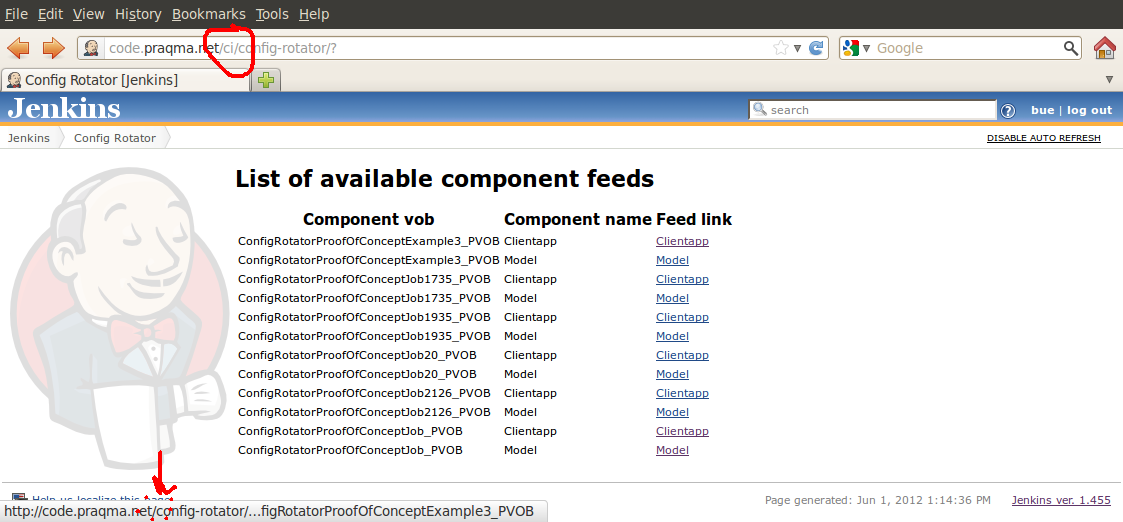
Config Rotator Atom feed links does not work if Jenkins URL is not a "base" URL in the Jenkins Configuration.
Reproduce: Click Jenkins front page, and then Config Rotator in left menu. There will be a list of Config Rotator component feeds. Click a feed to open it.
If your Jenkins Configuration has an extended Jenkins URL, like http://yourhost.domain/myJenkins/ instead of just http://yourhost.domain, the url is missing myJenkins.
In shown example "/ci" is missing in our setup and feed URL.
Work-around: Copy the link to your feed reader and insert the missing part yourself.