-
Type:
Bug
-
Resolution: Not A Defect
-
Priority:
 Major
Major
-
Component/s: core, dashboard-view-plugin
-
Environment:Jenkins 1.544 to 1.599 running on OS X Server 10.9.2
Web Browsers: Safari 8.0.3 on Mac OS X 10.10.
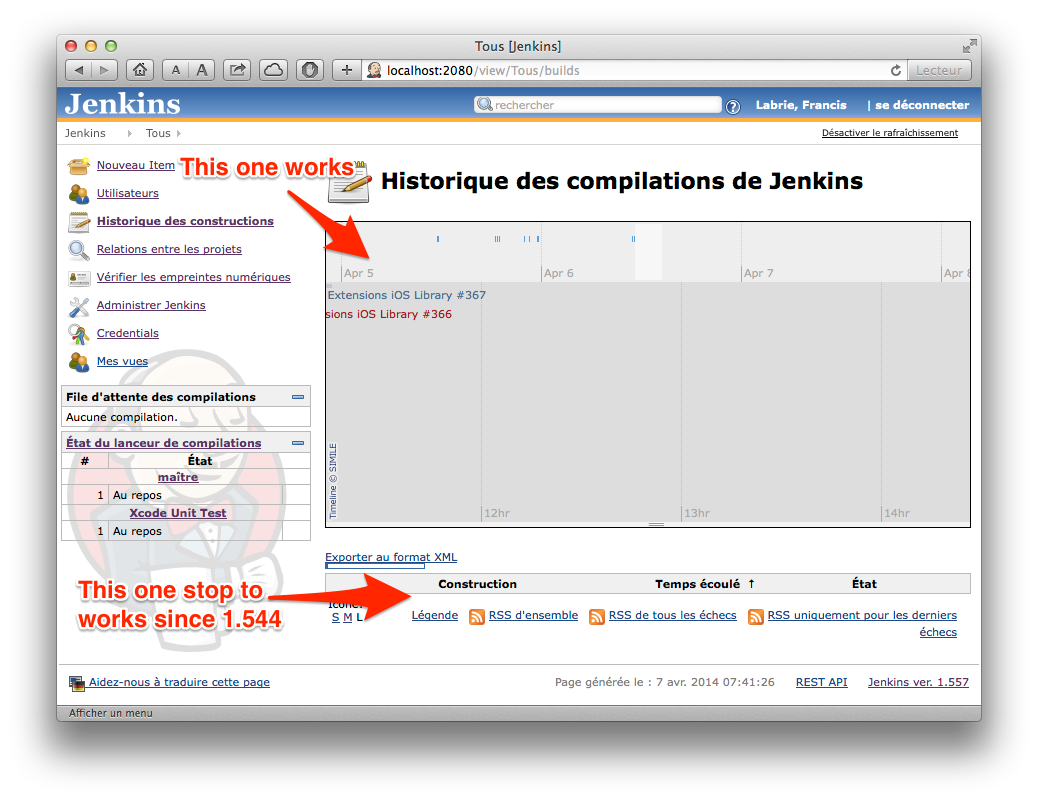
Since Jenkins 1.544, the Build Status section below the timeline graphic on the Jenkins Build History page is always empty on Safari 8.0.3. See screenshot below. Build jobs appear successfully in the timeline, but nothing is shown in the Build Status table below.
This issue is still present in current Jenkins 1.599. Below are the errors logged in the Safari browser Console:
[Log] locale set to en (common-content.js, line 98)
[Error] SyntaxError: Unexpected identifier 'événement'. Expected '}' to end a object literal.
	(fonction anonyme) (builds, line 153)
[Error] ReferenceError: Can't find variable: displayBuilds
	global code (builds, line 166)
[Log] locale set to en (common-content.js, line 98)
[Error] Failed to load resource: the server responded with a status of 404 (Not Found) (__history__.html, line 0)
[Error] Failed to load resource: the server responded with a status of 404 (Not Found) (message-left.png, line 0)
[Error] Failed to load resource: the server responded with a status of 404 (Not Found) (message-right.png, line 0)
[Log] locale set to en (common-content.js, line 98)
The Build Status table is not empty using Firefox 36.0 on Mac OS X 10.10, and only one error is logged in the Console:
aucun élément trouvé start:1:1
GET https://jenkins.mobile.cgi.com/view/Dashboard/__history__.html [HTTP/1.1 404 Not Found 31ms]